Practical information
This page contains practical information about using the cars.
When you book a car via Mileage Book, the car’s exact location will appear in the car’s name. Each car has a dedicated parking space, which is signposted with the license plate number and car number.
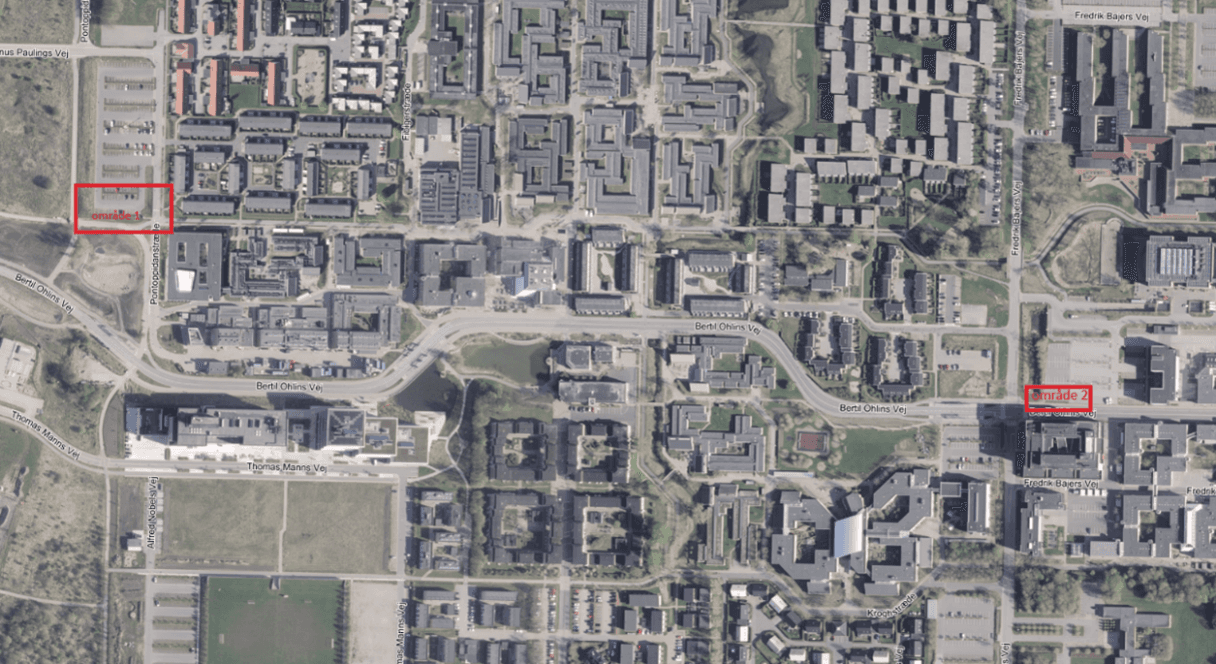
In Aalborg, the shared cars are distributed across two parking areas with associated charging stations:
- Area 1 – Pontoppidanstræde
- Area 2 – Bertil Ohlins Vej
AAU’s cars are equipped with keyless access. This means that you must use your phone to unlock and lock the car.
- When you are close to the car, open the Mileage Book Fleet app on your phone.
- In the app, tap Car key in the menu bar. Remember to allow the app to use Bluetooth and location — otherwise you will not be able to find the car.
- The car will appear with its license plate number and name. Tap the car you have booked.
- You will now see information about the car and its location. At the bottom, two buttons are shown:
- Lock: Locks the car
- Unlock: Unlocks the car
- As long as your booking is active, you can lock and unlock the car as many times as needed.
You can only unlock the car during the time period for which you have booked it. If you experience problems unlocking the car within the time period of your booking:
- Close the app completely.
- Wait a few minutes.
- Open the app again.
If this does not work, go through these steps:
- Check that you have downloaded the correct app. The app is called Mileage Book Fleet.
- Check that you are using Chrome as your default browser on Android phones.
- Check whether Chrome needs to be updated by going to Play Store, searching for Chrome and selecting “Update” if relevant.
- Check that your phone has installed all system/software updates.
- Check that you have allowed the Mileage Book Fleet app to use your location.
- Check that you have allowed the Mileage Book Fleet app to use Bluetooth.
Bilen skal parkeres på parkeringspladsen, som er dedikeret til den pågældende bil. Bilens parkeringsplads er skiltet med nummerplade. Det er vigtigt, at du sætter bilen til at lade, når du afleverer den efter endt tur.
Vi opfordrer til, at bilen afleveres mindst 60% opladet, af hensyn til den næste bruger.
På turen har du mulighed for at oplade hos Circle K og Q8:
- Kort til opladning hos Circle K og Q8 ligger i bilen.
- Du finder koden til kortene i bilens Quick Guide.
The car must be parked in the parking space dedicated to that specific car. The car’s parking space is signposted with the license plate number. It is important that you connect the car for charging when you return it after your trip.
We encourage you to return the car with at least 60% charge out of consideration for the next user.
During the trip, you can charge at Circle K and Q8:
- Cards for charging at Circle K and Q8 are kept in the car.
- You can find the code for the cards in the car’s Quick Guide.
The driving log is a combination of your booking information and GPS data. The GPS tracker in the car records start and end times, driving route and number of kilometers driven.
It is important that you have correctly filled in the purpose of the trip in your booking, and that the person listed as the car user in the booking is also the driver of the car.
It is possible to change the driver of the car, for example on longer trips where you want to take turns driving. This is done by having the new driver scan the QR code on the Mileage Book sticker inside the car and enter the purpose of the trip. The driver must be registered in the system.
Logging of data
All AAU cars are equipped with GPS trackers. The collected data is used for the electronic, legally required driving logs, calculation of CO2 footprint and to provide an overview of car usage with a view to optimizing the utilization rate of the car fleet.
The GPS units record information about the car’s trips to support the legally required driving log and calculate CO₂ emissions. The information includes, among other things, start and stop times, position and distance for each trip.
The system also records certain driving data, such as idling, acceleration, breaking, turns and speed. This information is used to calculate the car’s CO₂ footprint and not to assess the driving behavior of employees or students.
When you request access to book and use AAU’s cars, we register your personal data in the fleet management system, Mileage Book. Ordinary personal data is registered.
The system has been security-approved in accordance with GDPR rules. This means that access to data is restricted to the functions that have an operational need for the information, and that guidelines are in place for how data is stored and used.